


Magic Piano by Smule
3.890.10K Reviews
App Specs
- Version
- Varies with Device
- Updated On
- License
- Free
- Downloads
- 50,000,000+
- Developer
- Smule
- Categories
- Music & Audio
- Platform
- Android
Screenshots

 Analysis by AppCompare
If you’ve ever dreamed of playing the piano like a pro but don’t have the time or patience for lessons, let me introduce you to Magic Piano by Smule. This app is like having a personal piano tutor right in your pocket, and it’s perfect for anyone who wants to tickle the ivories without the fuss of traditional learning. I’d describe it more as a playful way to interact with familiar music than as a replacement for piano lessons, though. That difference matters once the first-week novelty wears off: the app can make a song feel approachable, but tapping along is not the same as learning to read music or play a keyboard independently.
Why the first few sessions feel inviting
What makes the opening sessions easy to settle into is the simple promise: choose a tune and take part in it right away. That’s a satisfying option when you have a few spare minutes and want to do something more active than listen to a playlist. I can see it fitting a short break, a quiet evening, or a family moment when someone wants to try a music game without needing prior experience. The low barrier to entry is a real strength, especially for people who find a traditional practice routine intimidating.
There is also a useful distinction between enjoying the performance and building a transferable skill. If your goal is to have fun following a song, the guided tapping gives you a clear task. If your goal is to become comfortable at an actual piano, you will eventually want an instrument and a learning method that teaches hand position, note reading, and independent rhythm. I would treat this app as a musical pastime or a first taste of playing, not as a shortcut to formal piano ability.
Getting Started with Magic Piano
First things first, downloading Magic Piano by Smule is a breeze. It's available on both Android and iOS, so no matter your device, you’re covered. Once you open it up, you'll be greeted by a sleek and intuitive interface that makes navigating through the app a piece of cake. The home screen is your hub, showcasing popular songs, categories, and even your own favorites. It’s a straightforward setup that doesn’t overwhelm, even if you’re a newbie. Smule is the developer behind this free music and audio app, which has been around since June 13, 2012. It is rated for Everyone, and the current version is 3.2.3, with Android 6.0 as the minimum operating system requirement.
Those details help set expectations without changing what the app is best at. The free starting point makes it easy to try, while in-app purchases range from $0.99 to $99.99 per item, so I’d check what an optional purchase covers before confirming it. The app has a 3.9 average from around 982,000 ratings, and has passed 50 million installs. Those figures suggest a wide audience, but they do not tell you whether its style of guided play will suit your own musical goals.
Song Selection
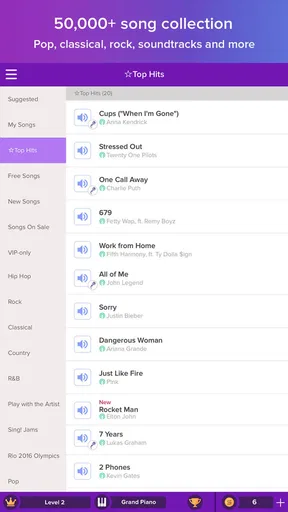
The song library in Magic Piano is impressive. Whether you're into classical music, pop hits, or movie soundtracks, this app has got you covered. I was pleasantly surprised by the variety. Just tap on a song, and you’re ready to start playing. The app helps you learn through a fun and engaging process where you tap along to the tune. There’s something truly satisfying about nailing a complex piece after a few tries.
For a more deliberate session, I’d choose a song based on how much attention I actually have rather than picking the most recognizable title. A familiar melody can make it easier to anticipate what is coming, while a difficult arrangement may turn a casual break into repeated attempts. If you are deciding whether to keep returning, try alternating between something comfortable and something that asks a little more of you. That gives you a better sense of whether the fun comes from the music itself or only from the challenge of a new track.
Worth Reading Before You Choose

EA SPORTS FC Mobile 26 Is a Bigger Football Game, but It Takes Time

Flipboard Shows What News Apps Must Do Beyond the Feed

Switching to Android Auto Means Rethinking Your Driving Routine

Google Calendar Makes a Crowded Week Easier to Manage

Ludo King Makes the Most of the Minutes Between Plans

Baby Panda World Brings Quick Play to Modern Phones, but Its Game Library Feels Busy
Song access is also part of the long-term decision. The app is free to start, but some content and features are presented as premium access, so I would avoid building a routine around a particular locked selection until I had checked what is available to me. If you mainly want one quick musical activity now and then, the free experience may be enough. If your enjoyment depends on having a very broad catalogue to browse, consider the recurring cost and purchase options carefully before treating it as a permanent music subscription.
Learning Curve
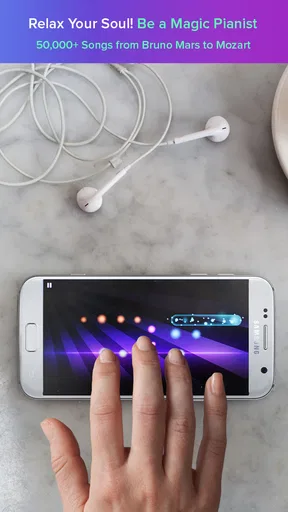
Now, let’s talk about the learning curve. The app is designed for all skill levels. You don’t need to be a Mozart to get started. Each song in the library comes with a difficulty rating, so you can start easy and work your way up. The app uses a unique system where you tap on beams of light that correspond to notes. It’s a bit like Guitar Hero but for piano. I found this approach both fun and effective. It’s like playing a game, but you’re learning a skill!
The important trade-off is that success inside the app is tied to following its visual prompts. That can sharpen your timing and make you more attentive to a melody, but it does not automatically teach you how to reproduce the piece on a physical keyboard. I would not use a high score as proof that I could play the same song away from the screen. If independent piano practice is the priority, pair this kind of guided play with lessons or a keyboard-based course; if relaxed interaction with songs is the priority, the game-like format is the point.
A practical way to keep the difficulty from becoming frustrating is to give a new selection a short trial rather than insisting on mastering it in one sitting. If the prompts feel too fast, switch to an easier piece and return later. That is more enjoyable than turning every session into a test. It also helps answer a common question for beginners: you do not need piano experience to start, but your progress in the app should be understood as progress with its tapping format, not a complete measure of musicianship.
Features and Fun
One of the coolest features is the ability to customize your piano sound. You can switch from the classic grand piano to quirky instruments like the harpsichord or even a funky synth. It adds a layer of creativity and fun to your practice sessions. Plus, you can connect with friends and share your performances. It's a social feature that adds a community feel to your musical journey.
Changing the sound can be a small but effective way to refresh a song you already know. I would use it as a playful variation, not assume that every instrument choice makes the experience more realistic. The same arrangement can feel different when its tone changes, which may help a familiar piece stay entertaining during repeat sessions. Sharing performances can add a personal reason to finish a track, although people who prefer private, self-directed practice may not care about the social side at all.
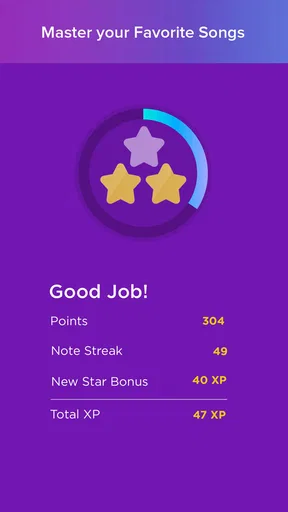
The app also includes a rhythm game mode, where you can challenge yourself or compete with others. It’s a great way to keep things exciting and push your skills further. I found myself getting a little competitive, trying to top the leaderboards!
That competitive loop is useful when I want a clear goal for a short session: play, see how I did, and decide whether to try again. It can also become a source of fatigue if every relaxed visit turns into chasing a better result. I would use scores as a prompt for another attempt only when that feels fun, rather than making them the reason to open the app every day. A music app should still be enjoyable when I am not in the mood to compete.
Subscription and Access
While you can enjoy a lot of the app for free, there are some premium features locked behind a subscription. The VIP pass opens up access to a broader range of songs, and if you’re serious about using the app, it might be worth the investment. I tried out the free version and found it quite generous, but the VIP pass is tempting with its vast library.
Because recurring value depends on what you actually play, I would spend time with the free portion before paying for a broader catalogue. Notice whether you return for different songs or keep choosing the same favorites; that habit is a better guide than the excitement of seeing many options. In-app purchases are listed from $0.99 to $99.99 per item, so the sensible move is to review the purchase details and billing terms shown in the app rather than assuming every option has the same kind of cost. If you only open it occasionally, paying for expanded access may not earn its place in your budget.
Keeping it in your routine
For month-to-month use, I think the strongest case is variety in short bursts. Imagine waiting for a meal to finish or winding down after work: a quick attempt at a song can feel more engaging than scrolling through videos, and you can stop when you have had enough. It suits people who enjoy recognizable music, light challenges, and the satisfaction of trying a piece more than once. It is less suited to someone looking for a serious curriculum, a full digital piano, or a substitute for hands-on instruction.
Maintenance is light in the everyday sense: you do not need to tune an instrument, arrange a practice space, or prepare sheet music before opening the app. The more meaningful maintenance is deciding what you want from it. Keeping a few favorites handy and occasionally choosing a new challenge can prevent aimless browsing. On the other hand, if you find yourself spending more time deciding what to play than playing, or repeatedly returning only because of competitive scores, that is a sign the habit may be losing its appeal.
Compared with a standard music-streaming app, this is not mainly about putting on a soundtrack; it asks you to participate. Compared with a piano-learning app, it leans toward immediacy and game-like enjoyment rather than building a structured foundation on a real keyboard. That makes it a pleasant middle ground for casual music fans, but an imperfect fit for both passive listening and serious skill development. Before installing, it helps to ask a simple question: do you want to play along for fun, or do you want to learn piano in a way that transfers to an instrument?
Final Thoughts
Overall, Magic Piano by Smule is a delightful app for anyone interested in learning piano at their own pace. It’s engaging, easy to use, and packed with features that make it stand out. Whether you’re a complete beginner or someone looking to brush up on your skills, this app offers something for everyone. I found myself spending way more time than I intended, simply because it's so much fun!
So, if you’re ready to dive into the world of music without the hassle of traditional lessons, give Magic Piano by Smule a try. Who knows, you might just discover your inner maestro!
My longer-term recommendation is more measured: give it a few casual sessions and see whether you still want to return once the first novelty has passed. If you enjoy tapping through songs, experimenting with sounds, and occasionally sharing a performance, it can earn a place as a compact music game. If your real aim is to play piano away from a screen, or if subscriptions and repeated score-chasing would annoy you, a more structured learning option—or simply listening to music—will probably serve you better.
Pros
- Wide variety of song choices.
- Interactive and user-friendly interface.
- Allows duet performances with friends.
- Regular updates with new songs.
- Customizable difficulty levels.
Cons
- Requires internet for full features.
- Ads can be intrusive at times.
- Limited free song access.
- In-app purchases can be pricey.
- Occasional lag on older devices.
FAQs for Magic Piano by Smule
What is Magic Piano by Smule?
Magic Piano by Smule is a mobile app that allows users to play their favorite songs on a virtual piano. The app features a vast library of songs from various genres and artists, providing an immersive musical experience. It’s designed for both casual players and music enthusiasts, offering easy-to-learn gameplay that adapts to your skill level.
Is Magic Piano by Smule free to use?
Magic Piano by Smule is free to download and play, but it offers in-app purchases. Users can buy premium subscriptions for access to additional songs, features, and an ad-free experience. While the free version includes a decent selection of songs, the premium plan offers a more extensive library and enhanced user experience.
How does the gameplay work in Magic Piano by Smule?
In Magic Piano by Smule, players tap on beams of light that correspond to notes in a song. The timing and rhythm are crucial to score high points. The app adjusts the difficulty based on your progress, making it suitable for all skill levels. It also includes features like rhythm challenges and custom playlists to keep the experience engaging.
Can I play Magic Piano by Smule offline?
Magic Piano by Smule requires an internet connection for downloading new songs and accessing social features. However, once a song is downloaded, it may be available to play offline. For the best experience, especially if you're using the premium version, a stable internet connection is recommended to fully utilize the app's features.
What devices are compatible with Magic Piano by Smule?
Magic Piano by Smule is compatible with most Android and iOS devices. It requires Android 4.1 and up or iOS 9.0 and later. The app is optimized for both smartphones and tablets, providing a seamless experience. Always check the latest compatibility requirements on the app store to ensure your device is supported.


